[GIT] Support for password authentication was removed on...
사실 꾸준히 아래와 같은 메일이 왔었다.
현재 github에서는 pw 기반의 authentication 인증에서 token 방식으로 바꾸려고 하고 있다.
You recently used a password to access the repository at ... with git using git/2.30.1.
Basic authentication using a password to Git is deprecated and will soon no longer work. Visit https://github.blog/2020-12-15-token-authentication-requirements-for-git-operations/ for more information around suggested workarounds and removal dates.
Token authentication requirements for Git operations | The GitHub Blog
Beginning August 13th, 2021, we will no longer accept account passwords when authenticating Git operations on GitHub.com.
github.blog
다음에 해야지 무시하고 있다가 결국.....
remote: Support for password authentication was removed on August 13, 2021. Please use a personal access token instead.
remote: Please see https://github.blog/2020-12-15-token-authentication-requirements-for-git-operations/ for more information.
fatal: unable to access URL The requested URL returned error: 403
해결은 간단하다.
1. https://github.com/settings/tokens 에 접속하여 Generate New Token을 해주면 된다.
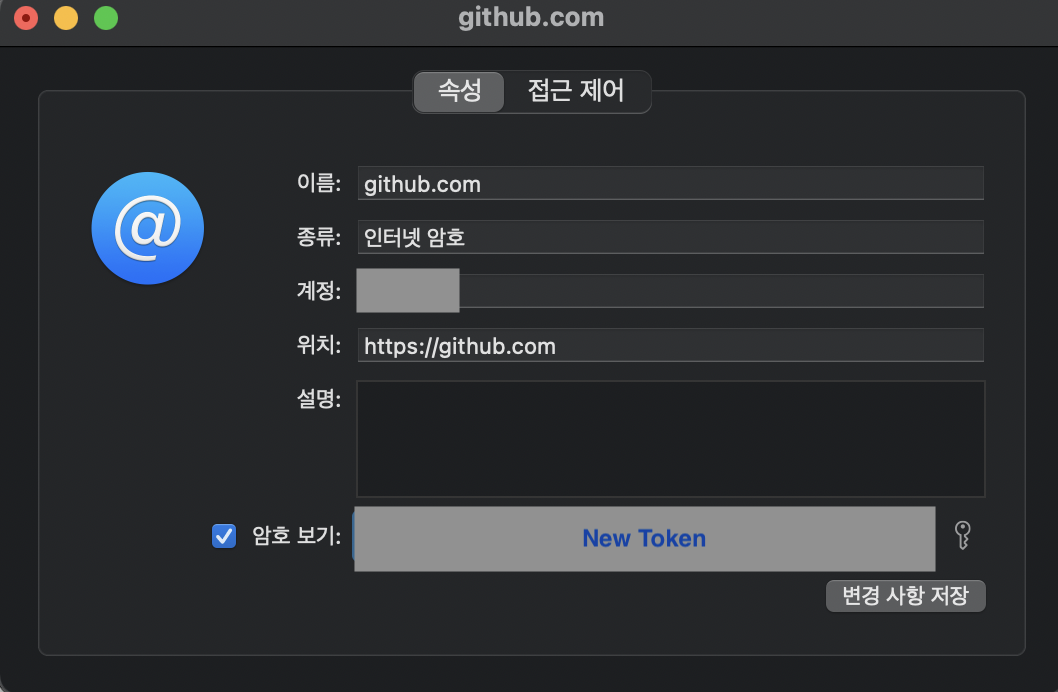
2. 그리고 MAC에서 Keychain Access에 접속한다.
3. Keychain > 로그인 > Github Key를 클릭한다.
4. Github에서 새로발급 받은 Token을 넣어준다.
그러면 정상적으로 다시 push가 가능한 것을 확인할 수 있다.
윈도우는 제어판 > 자격증명관리 > git:https://github.com 를 수정해주면 된다.